"For the FITALY layout, we have obtained an average travel of 1.8, to be compared to an average travel of 3.2 for the QWERTY layout. (For prose, involving few numbers and symbols, the results are even better.)"
"Please use this idea! If you are a software developer, I urge you to consider adding this functionality to your product. My hope is that ten years from now, we won't have to laboriously tap out messages letter by letter, but instead will be able to zip them out quickly and efficiently with something like HexInput." -Sept2006
We did a lot of experimentation with keyboards in Android - finding better ways to type and click is pure HCI dream work
The key challenge is:
- At first, people don't care about speed - they just want to type well and accurately - for most people, that means standardised layout across all their devices, and they won't consider phones that push them into other models.
- Only after they've mastered that standard layout do they start to care about speed, but by then they've gotten good enough at the basic system that swapping to anything else is too much of a regression
So I really do love the existence of third party keyboards that cater to the set of people that are willing to deal with that setback
I wanted to install it to give it a try, but in the playstore I saw the application roughly translated is "susceptible to share my approximative location with other enterprises or organization".
I must ask, what could the reason(s) for a keyboard have access to a location ?
I’ve always thought about copying other useful apps that are clearly trying to collect data or make you pay for stupid IAP, and then publishing and maintaining it through donations. The apps would all be free in the various offical stores.
same thought, we've been using smartphones since 2 decades now, and not just we dont have a problem with qwerty, but anything new will be requiring more cycles to get accustomed to
I really want to see the visualization of words as the swipe typing patterns. I tried doing it on paper and realized I couldn't understand it just by looking but once I started visualizing it and swiping in my head I could start to get a feel for it. The tricky part is figuring out where in the keyboard the stroke begins
People riding horse buggies probably thought the same when powered vehicles first came about, and look at the world now. You won't know unless you give it a honest try.
QWERTY won't be replaced on phones until there is a full phase change in how people interact with their phones that absolves us of keyboards entirely. Anybody here who thinks otherwise is welcome to make an offer to buy my two decades of notes on the topic.
Japanese have a flick-style keyboard, very similar to T9. Instead of pressing a key multiple times, you press one key then flick up/down/left/right to choose a letter on that key.
I find there's a lot more intention behind your actions and I make far less typos when I'm flicking in Japanese vs typing on a touchscreen QWERTY. Being a second language, typos are even more common because its not at recognizable at a glance you made them, so the flicking been a huge improvement.
I always wonder if English should have something like this. I guess "MessageEase" is the most similar thing...
Not on a phone right now, but you have to type in sample text above and press check. Bad UI choice of showing bars before text has been entered and separating bars from the input field by additional text.
The thing I dislike about smartphone keyboards is the amount of screen real estate they use. This keyboard seems to take more screen real estate rather than less.
Yeah, the example is pretty bad. This layout also seems to be hard so squash vertically without increasing the error rate a lot compared to a normal one. The error rate on smaller sizes is something a lot of novel touchscreen keyboards should probably have focused on instead.
If one could swipe through the center without inserting a space, it would be incredible instead of perhaps only great... There was a PalmOS 5 keyboard like this named myKbd(1) based on some IBM research(2) which was quite fast to use. the atomik layout was quite quick to use.
I'm a user of ClearFlow, a layout with similar design goals (and it's available on GBoard by default). Interestingly, ClearFlow is an ortholinear layout, but I'm not sure if that's due to a limitation of GBoard or the intention of its author.
I think the key to smartphone keyboards is something like Nintype, two-finger swiping. It's incredibly fast and doesn't require you to learn a completely new keyboard layout to succeed.
It's also a lot more comfortable for one-hand typing since you can do multiple swipes per word.
Funny that looking at their "number of touches" and "distance covered" checker, I've tried a few words and thinking in my head how it'd be in Nintype and it would score far better than Keybee.
Unfortunately I haven't seen anyone since Nintype (and the older Keymonk) to give it an attempt.
somehow , i get the sneaking suspicion, that while not perfect, qwerty actually works on mobile phones because it’s focused on not conflicting keys when typing (so tapping with thumbs work /better/ because of this).
for example, "The quick brown fox jumps over the lazy dog.” — < means left hand, > means right hand. you can see in a common phrase like this, you alternate sides more often. when you’re thumb-tapping, i think this is useful.
Well, it’s interesting, but who is heavily working with text, which requires a lot of typing, and only has a smartphone? Phones are mostly for consuming. For creating, it’s usually easier and more comfortable to use a device with a keyboard (PC or laptop)
2) In my (wealthy, Boston area) suburb most high school students do all their work - including writing multi-page papers - entirely on their phone. They think laptops are for old people.
Ok, but you still can't get actual work done on a smartphone with any efficiency.
> In my (wealthy, Boston area) suburb most high school students do all their work - including writing multi-page papers - entirely on their phone. They think laptops are for old people.
Kids are stupid. We were stupid when we were their age too. They will learn eventually that to get serious work done, you need an actual computer.
"May be able" refers to collect, which is entirely up to the app. It does have access to password as you write them with it. It doesn't know what you're writing and it MAY collect. But it's not clear if it does collect.
Very cool. The biggest questions someone skimming would likely be why the letters are in this order, and how this is consumed (eg ios app?). You may answer those details but they were not front and center to me.
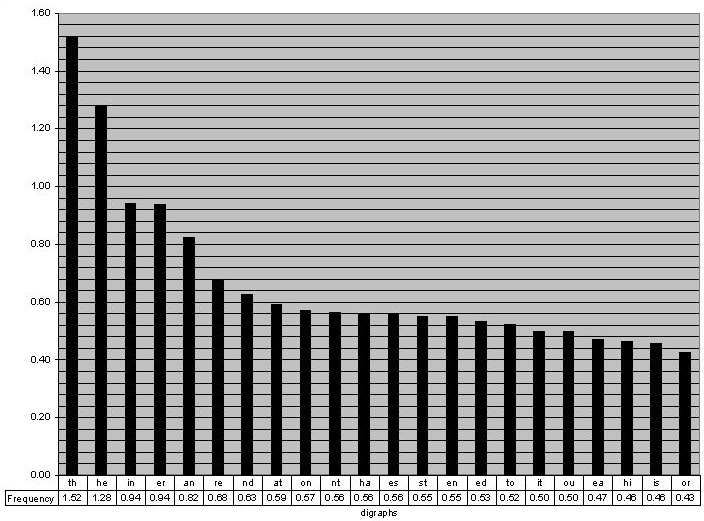
Looking at the English keyboard and the English digraphs, it doesn't seem like the coverage is that well optimized. We are currently capturing 8.65% of the digraph weight, but just getting the top-5 would account for 5% by itself.
I also feel like distance travelled is the wrong (or an incomplete) metric. Change in direction seems like a good proxy for mental or physical effort. To take it to an extreme, I'd be very satisfied with a keyboard that had me move my thumb in a circle as on the original iPod, provided it just read my mind and inputted the right text. That's extreme distance but little effort.
    +---------+---------------+-----------+-------------------------------------+
    | Digraph | Frequency (%) | Adjacent? | Pair on Keyboard                    |
    +---------+---------------+-----------+-------------------------------------+
    | TH      | 1.52          | Yes       | T is right of H                     |
    | HE      | 1.28          | No        | Separated by O and [Space]          |
    | IN      | 0.94          | Yes       | I is top-left of N                  |
    | ER      | 0.94          | Yes       | E is below R                        |
    | AN      | 0.82          | No        | A is bottom-center; N is top-right  |
    | RE      | 0.68          | Yes       | R is above E                        |
    | ND      | 0.63          | No        | N is top-right; D is bottom-right   |
    | AT      | 0.59          | No        | Separated by [Space] and S          |
    | ON      | 0.57          | No        | Separated by H and T                |
    | NT      | 0.56          | Yes       | N is top-right of T                 |
    | HA      | 0.56          | No        | Separated by [Space]                |
    | ES      | 0.56          | No        | Separated by [Space]                |
    | ST      | 0.55          | Yes       | S is below T                        |
    | EN      | 0.55          | No        | N/E are on opposite sides           |
    | ED      | 0.53          | No        | E is center-left; D is bottom-right |
    | TO      | 0.52          | No        | Separated by H                      |
    | IT      | 0.50          | Yes       | I is above T                        |
    | OU      | 0.50          | Yes       | O is below U                        |
    | EA      | 0.47          | Yes       | E is top-left of A                  |
    | HI      | 0.46          | Yes       | H is below-left of I                |
    | IS      | 0.46          | No        | Separated by T                      |
    | OR      | 0.43          | Yes       | O is below R                        |
    | TI      | 0.34          | Yes       | T is below I                        |
    | AS      | 0.33          | Yes       | A is below-left of S                |
    | TE      | 0.27          | No        | Separated by H and [Space]          |
    | ET      | 0.19          | No        | Separated by H and [Space]          |
    | NG      | 0.18          | Yes       | N is above G                        |
    | OF      | 0.16          | Yes       | O is below F                        |
    | AL      | 0.09          | Yes       | A is right of L                     |
    | DE      | 0.09          | No        | E/D are distant                     |
    +---------+---------------+-----------+-------------------------------------+
I agree that distance is not a great metric. The maximum travel distance on a smartphone screen is already tiny. I'd say the best metric is accuracy or lack of amibiguity, something like average confidence level that any given swipe means a particular word and not another. (This is assuming swipe-based word entry, which I much prefer to anything tap-based.)
For me, as a two thumb typer, I feel like if you had kept the letters generally on the same side (left/right) as Qwerty, even if nowhere near the same location, I could adapt to it much more quickly.
I go to spell something as simple as my name on this and none of the keys are anywhere near where 40 years of muscle memory expect.
Frankly, I just want to hit the letters with the same thumb.
I understand not wanting to copy, to be a purely original creation, but you could certainly help adoption by making it a little less painful.
Oh dear. I'm afraid I'm not going to the take the requisite dozens of hours to be sure by learning this keyboard and making a truly "fair" comparison, but I'd bet I'm faster swiping with the current keyboard than I would be on this one. Swiping is why I can use words like "comparison" or "requisite" on a phone without giving it much thought anymore. I'm still faster on a real keyboard, especially as I rarely get those "tried to write 'hello', got 'grump'" sorts of errors with a keyboard, but it's a lot closer than it was when mobile devices first came out out and Palm's Graffiti input was considered a major breakthrough. (Laughable by modern standards.)
This is gonna be like Dvorak where eventually we all figure out that it’s not significantly faster and you had to re-learn how to type just to figure that out.
I submit the idea that for most smartphone users, distance traveled and layout are not the limiting factor for typing speed.
> This is gonna be like Dvorak where eventually we all figure out that it’s not significantly faster and you had to re-learn how to type just to figure that out.
Generally nowadays people don't learn Dvorak because it's faster, they learn it because it reduces finger travel and effort.
Much better to use completion/expansion facilities than to learn a non-standard layout. Trying to use any device when you're used to Dvorak is such indescribable suffering.
Rather than experiencing that in exchange for a tiny amount of saved effort, stick with QWERTY and press TAB/etc to skip most of the typing.
I find another factor that is not always discussed is comfort and how pleasant it is to use a layout. I know Dvorak is not much faster in the end but it is such a joy to use in comparison to Qwerty. I do wonder if it would be fun or just nice to use this hex-grid layout on a phone.


"For the FITALY layout, we have obtained an average travel of 1.8, to be compared to an average travel of 3.2 for the QWERTY layout. (For prose, involving few numbers and symbols, the results are even better.)"
https://www.textware.com/fitaly/fitaly.htm
https://the-gadgeteer.com/1998/08/22/fitaly_review/
And closer to OP, "HexInput":
"Please use this idea! If you are a software developer, I urge you to consider adding this functionality to your product. My hope is that ten years from now, we won't have to laboriously tap out messages letter by letter, but instead will be able to zip them out quickly and efficiently with something like HexInput." -Sept2006
https://www.strout.net/info/ideas/hexinput.html
1996, 2006, 2026... Your turn?
reply