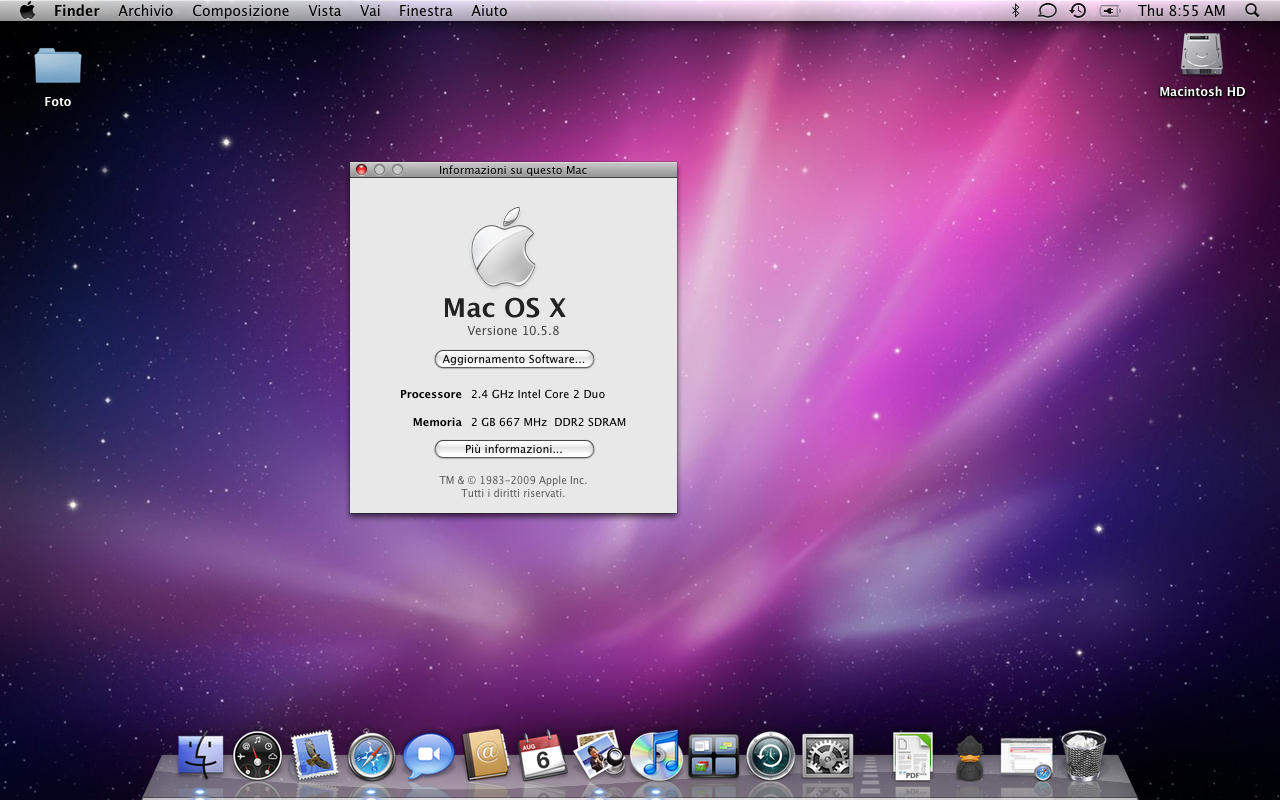
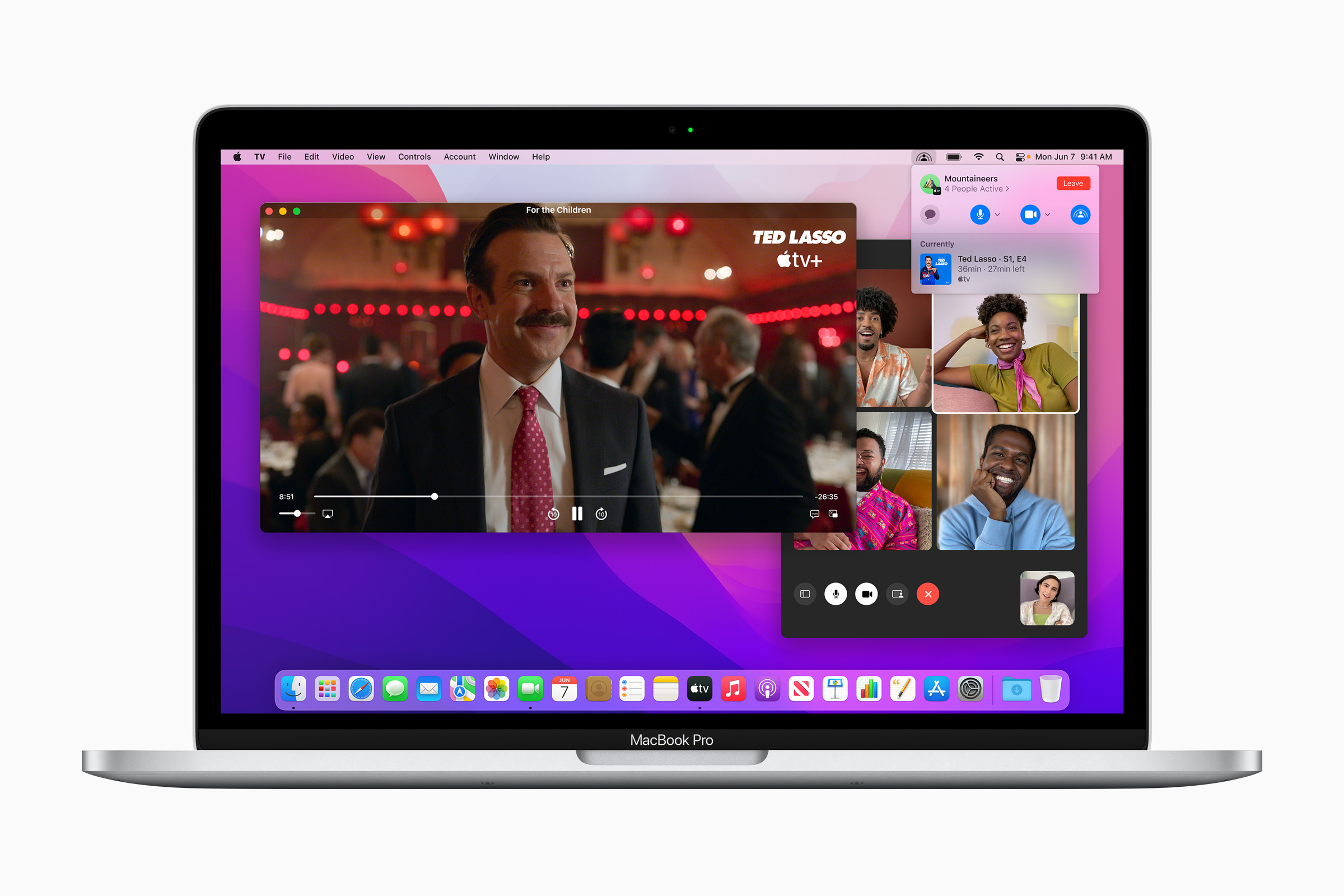
I really miss the colors and contrast of Snow Leopard. I was able to relatively okay with things up to High Sierra. Mojave brought random freezes on wake (~10s) on my Macbook Air 2015, Catalina brought call-home on every executable. Big Sur redesign just killed it. I don't like the unicorn coloring book for kids to be my OS! There's no contrast, there's just too much wasted space everywhere (I don't use external monitors). So all and all, I'm running ubuntu unity ( https://ubuntuunity.org/ ) with Ambiance. Those have the right contrast for me. And I brought in Menlo and Lucida Grande fonts in for GUI and terminal.
Those more round corners since Big Sur get on my nerves too :-( I'm sure I was using it wrong tho ... :-P
Up to Snow Leopard, OS X updates felt like little Christmas mornings. It went downhill starting with Lion. I’ve stopped caring about new features, there’s too much churn anyway.
In the early 2000th when I was introduced to Apple Macs (G3 iMac MacOS9) I couldn’t understand who wanted to work with these machines. I tried out macOS-X in the school Labs and the only piece of software I actually liked was iTunes (I know weird). It took years and then I saw a machine running leopard and the coverflow in Finder etc. I thought wow this looks and feels so much cooler than my ugly windows XP/Vista. I convinced my wife to buy a MacBook and bought the Snow Leopard update. Freaking unbelievable. I switched to Mac myself and it was such a joy ride. Everything was just working and I actually felt real joy. Updates later and I don’t feel like this anymore. It started with the 2017 MacBook I got from work (the worst machine I ever had to use) This was only hardware. But the software broke under me as well with the introduction of Catalina. I still run a Mac at work cause the company only supports windows and Mac. At home I switched to Linux and try to become the maker of my own joy.
I think they ran out of low hanging fruit pretty fast. Tiger was great, and once they added multiple desktops that was all they really had to do with OSX and it was complete, lightweight, performant. Too bad the more recent stuff has been just taking away things (32 bit, eventually x86 compatibility if thats the trend), or making it annoying (having your OS yell at you every time you open something not from the mac app store is patronizing).
2009 marked the last year of good Operating System releases with both Windows 7 and Snow Leopard shipping that summer. After this point, bloat became good, non-flat design became bad, and existing system apps started to be replaced with buggy alternatives.
Lion was a bad release filled with bugs, but it introduced a lot of features I don't think I could live without. Things like high DPI support, the ability to render emoji (!), and the ability to rename a document from an app's title bar. Behind the scenes, Lion is when Apple introduced Automatic Reference Counting. And, while I know they're controversial, I really like how Apple implemented full screen and auto saving, particularly after the Apple tweaked them in Mountain Lion.
Mountain Lion went a long way towards fixing Lion's problems, and Mavericks just about finished the job. Which is why I run Mavericks. The only remaining Lion things I really dislike are the Launchpad, the hidden Library folder, and some minor-ish aesthetic differences. I've patched some of these.
Hi Wowfunhappy, you got me thinking. Like ... really thinking. So, to cut long story short, I've installed Maverics in a VM to do a short & free PoC, how much would I like this "retro" experience with iWork, iLife and friends.
Turns out, very much! So I've grabbed a refurbished mac mini from 2012 and now I'm running Maverics on real hardware and absolutely love it! I've even patched the snow leopard window controls, so I'm one happy camper! Thank you!!!
> Behind the scenes, Lion is when Apple introduced Automatic Reference Counting.
Hm. I've never written anything serious for Apple platforms but of course played around for a bit. But, I've always assumed ARC is implemented purely in the compiler, isn't it? I remember disassembling something I wrote and learning that the compiler inserted retain/release calls as necessary.
> Which is why I run Mavericks.
Actually, I ran Mavericks for several years after it was superseded. I was made fun of by some people (who complained about glitchy WiFi on Yosemite, lol). Had to finally update when I got a new job and needed to compile an iOS app, which required latest Xcode, which required latest macOS. Then I stayed on Mojave for like 2 more years, refusing to update to Catalina to keep using 32-bit apps. And then several months ago I bought an M1 Max MacBook, which means Monterey.
I haven't been excited for a MacOS update since Mojave. Since then, it's always been a question of "how much are they taking away this time?" instead of "what have they added?"...
> 4. Disabling all the new phone-home daemons Apple added.
Would you care to elaborate what do you disable?
I didn't use any icloud stuff and was kinda shocked how much the OS called the mothership after installing little snitch ... Never properly gotten into finding what every daemon does and if I could disable it.
The script at this gist [0] has been my starting point for disabling Apple daemons.
I typically have to spend some time bisecting this script to keep the few services I need (e.g. Messages) running. It's time-consuming because some services depend on others that have different names, so it's not as straightforward as simply re-enabling every daemon that contains the string "message."
Little Snitch [1] is also quite useful; it's probably easier to install LS with everything disabled and then gradually reenable the daemons you want. I use LS more than I use the above script these days...although LS still allows the daemons to run and consume CPU time, which the script stops. Probably best to use some combination of both approaches, and keep track of any edits you make to the script because Apple will likely reenable everything the next time you upgrade MacOS.
10.6.8 was the absolute pinnacle for OSX for me, but I can't resonably use it daily anymore, so now Mojave is my stopping point. Too many of my necessary applications don't run on Catalina. I worry about the security of staying behind, but none of the new features are relevant to me.
There's an accessibility setting to add borders to toolbar buttons, I had to turn that on to undo all the cLeAnLInEsS and make the damn thing practical. I still wish I could undo the toolbars combined with title bars as well — they're cramped for no good reason yet "airy" because of way too much padding. But then these things apparently don't inconvenience me enough to patch the OS to have it my way.
Switching to other OS is not an option for me at this point. Everything else is even worse. Windows is a piece of malware at this point (in addition to being a UX consistency clusterfuck and Microsoft's insistence on making touchscreens a thing), desktop Linux is as much of a nightmare as it's always been.
I am happy to see someone else recommending Ubuntu Unity, especially as being Mac-like. It remains my default OS for my laptops and it continues to improve; version 22.04 uses mainly MATE accessories, to provide proper menus and toolbars, and also supports Flatpak.
I think it's undeserved. Unity was and is a damned good desktop, it's just different. Some people are neophobic. There's more to life than the Win95 desktop.
IMHO Canonical's only big mistake, really, was Mir.
Wayland remains controversial, and I'm not qualified to judge why. But like systemd, it is basically the new standard, and so going with it would have been pragmatic.
Trying to write a new WM _and_ a new desktop _and_ a mobile OS _and_ a new packaging format _and_ a new display server was a big stretch. Eliminating one big chunk of it seems like a win to me.
Apparently not to them: they pressed ahead and then abandoned the whole thing.
Damned shame. _Someone_ in the Linux world needed to address mobile/tablets. It is the entire herd of elephants stampeding about the room.
IMHO a few sketchy efforts based on GNOME and KDE are not really enough.
I mostly agree with everything you've said here. Frankly, I don't think Wayland has the functionality to support what people want to do on Desktop Linux. Wayland apologists will claim "that's the point", which I would be willing to agree with if the development of things like Mutter and wlroots weren't so spread apart. It's resulted in a scenario where two and a half desktops actually support Wayland, and even those don't have feature-complete implementations. GNOME, Sway, and especially KDE are still playing catch-up with x11 functionality. That's simply unacceptable for a software project that's 10 years in the making.
Wayland is going to have a hard time being "the new standard" if it continues down it's path of less hardware compatibility, less software compatibility and less overall functionality. I'm willing to point the finger squarely at GNOME here too, because they've intentionally gimped Wayland's development over the years under the guise that they're the lead implementation, while giving the rest of the community the pittance of wlroots. This has been disastrous to the development cycle of Wayland, and ended up splintering the wrong projects and blocking the right features. Stuff like app tray indicators have been completely depreciated on a system level solely because GNOME said they didn't want them. It's really petty, and it certainly isn't moving desktop Linux forward.
In general, everything GNOME-related after Unity has just been a really slow downhill decline. The freshness and uniqueness of the desktop is dead, all we're left with now is a lame Mac clone that can't even play nice with the rest of the community. This is probably a real "old man yells at cloud" moment by most respects, but watching their behavior in recent years frustrates and disappoints me. They used to be a pretty respectable group of maintainers; now it's just drip-fed patches, gutting old features and setting inane new precedents as "the standard" and getting mad at downstream maintainers when they don't adopt them.
> Frankly, I don't think Wayland has the functionality to support what people want to do on Desktop Linux.
The problem is that people don't want one single thing from desktop Linux. For some people, for instance, remoting the whole GUI over the network is really important, whereas TBH I suspect that for most people, it isn't important at all and in fact is not only irrelevant, it's actually a hindrance to stuff they want, such as (random examples) very high frame-rate 3D-accelerated true-colour graphics driven by a modern GPU.
And I suspect that you can't have it both ways.
Me, I want independently settable fractional scaling on multiple monitors. I don't give a stuff about frame rates, resolution, hi-DPI support, OpenGL, any of that, but what my 2015 Retina iMac does -- plug in a screen and whatever its DPI the OS just magically adjusts the display settings so everything remains the same size -- that is very important to me. I don't want to do it myself. I don't want or care about or need 3D or anything. I just want all my screens to be nice and sharp and show the same thing at the same size. Resolutions are a trivial implementation detail I don't care about.
My impression is that this isn't on the radar of any mainstream distro.
As for my desktop, I want to be able to place toolbars or panels on the edges of the whole desktop, across 2 or 3 or more screens, where I choose, not where the programmers chose. GNOME is not even able to think about this idea. You get what the designers chose because they know best.
KDE used to do it, badly. KDE 5 does it worse. I don't like it, either.
Oddly, for all the hoopla about Gtk $VERSION and weird stuff about refresh rates and stuff I don't care about, Xfce, the old-fashioned low-tech desktop does this best. Go figure.
All of them are rubbish compared to how macOS handles this stuff, and Windows 10 was only a bit better. Windows 11 is as broken as GNOME etc.
That's progress. Apparently.
It makes me want to go back to a text-only console sometimes. But I am very very old and opinionated, and then I blow the minds of all the xNix fans by saying that I don't actually like the xNix shell and never did. Any of them from `sh` to `fish`, they all annoy me. I preferred the MS-DOS and OpenVMS command lines, myself.
Since most other people who can remember before xNix ruled the waves are retired or dead, that is foul heresy to most techies alive today.
There is an option "increase contrast" in accessibility, plus a slider to adjust the display contrast, plus a set of color filters for color blindness that can be quite useful even if you don't suffer any of the specific conditions.
Thanks! I'm aware of this. I don't know how to describe it properly - the old OSX icons, even the "lickable" control buttons in snow leopard look just right. It's almost like there's a black line around the icons, the saturation is right and also colors go right together. I don't see this in Big Sur or Monterey. It's just oversaturated pastels without clearly defined borders. Looked slightly better in dark mode, but I prefer light mode. Snow Leopard (https://apparelever169.weebly.com/uploads/1/2/4/9/124908212/...) vs. Monterey (https://scr3.golem.de/screenshots/2106/MacOS-Monterey/Apple_...) - random searches for screenshots.
I'm currently running Mavericks on a Hackintosh with an i7-4790K a GTX 780 6GB. I wrote some more details on how I arrived at this point, and other things I tried, down-thread: https://news.ycombinator.com/item?id=31206278
No one has asked about security yet, which always seems to come up. My feeling is that (1) my computer is behind a router with up-to-date firmware, (2) I'm using an up-to-date web browser, (3) I'm relatively careful about what software I install, and (4) I regularly back up my data to cold storage. There are absolutely gaps, but in exchange for this small risk, I enjoy using my computer much more than I would otherwise.
SIMBL lives on mostly thanks to w0lfschild, see: https://github.com/w0lfschild/MacForgeFramework. This repo hasn't been updated since 2018; I'm not entirely clear whether the most recent versions of MacForge is still based on SIMBL.
Do you trust the bootloaders that you have to use to run Hackintosh? I haven't run one in several years, but at the time I used the Clover bootloader. It was the best I could find but it was written in Russia. I just couldn't trust it when accessing any sensitive information on my computer.
Sorry if you have already answered in another thread.
I still use Clover. It's a relatively old project and it's completely open source. It has been worked on by a lot of talented developers over the years, some of who are based in Russia—but I'm disinclined to dismiss it out of hand because of that. Particularly since it long predates the most-recent international craziness.
The new standard for Hackintosh bootloaders is OpenCore, but I've been using Clover for years and haven't had any problems with it. And, I suspect Clover has been tested more extensively with older versions of OS X, just by the nature of when it was developed and released.
I haven't played with hackintosh in like 12 years. It was a hassle then a couple years after I stopped I got a real imac.
I'm not sure what the current deal with hackintosh is, but I'm vaguely under the impression that there's at least one that is open source, then there's an open source boot loader rEFInd as well.
Hopefully someone can confirm or refute my impression.
My feelings about Mac OS X are similar to the author's. I switched from a Windows XP/FreeBSD dual boot configuration to Mac OS X Tiger back in 2006 when I bought my first modern Mac, a Core Duo MacBook. I've remained a Mac OS X user from Tiger all the way to Mojave. Mac OS X in the 2000s to me was heads-and-shoulders better than the competition. It had a well-designed user interface, and most applications conformed to the Apple Human Interface Guidelines. It also provided me a Unix shell whenever I needed it. In my opinion Mac OS X peaked at Snow Leopard; in fact, I'd be comfortable using Snow Leopard (or even Tiger) as my daily driver today if it supported current hardware and if there were a modern web browser for it. It was a nice marriage of NeXT technology and an updated version of the venerable Macintosh user interface. It felt much more pleasant than Windows of the era (though I admit I liked Windows 7), and the desktop environments for Linux and the BSDs simply didn't compare.
Then came the Tim Cook era, and with it came the gradual locking down of the Mac, both in terms of hardware (for example, the soldering of formerly upgradable components such as RAM and storage) and software (for example, notarization). The user interface also gradually started adopting more iOS influences, which I think take away from the desktop experience. Due to my disappointment with Apple's direction (especially since roughly 2016), I opted not to upgrade my aging 2013 MacBook Air and 2013 Mac Pro with new Macs, instead switching to a Microsoft Surface Pro (running Windows 10) and a custom Ryzen 3900X build (which runs both Windows 10 and FreeBSD). I miss macOS, but I enjoy the openness of PCs, and I enjoy the flexibility of Windows and FreeBSD.
I am keeping an eye on two very interesting projects that attempt to replicate the spirit of early Mac OS X: helloSystem (https://hellosystem.github.io/docs/) and airyxOS (https://airyx.org/). Both projects are based on a FreeBSD foundation, but the major difference between the projects is airyxOS is a much more ambitious attempt to reimplement macOS's infrastructure (even going as far as to aim for supporting "trivial" Cocoa applications), while helloSystem has different (Qt) underpinnings, with an emphasis on replicating the Mac OS X look-and-feel and promoting adherence to the Macintosh Human Interface Guidelines. If these projects become successful, this will provide people who desire the early Mac OS X experience modern systems that will maintain that experience.
I cannot use Linux or BSD, as - for instance - I am an almost 20-year daily user of Logic Pro.
I’d lose access to 20 or so years of musical projects, and I’d have to get used to some completely new DAW, none of which appeal to me.
I also do iOS and WatchOS development as my main source of income, meaning I’m completely stuck on MacOS. I make a lot of money doing it and it’s kept me solidly employed for a decade.
So - while I personally can’t jump over to any alternative OS without shooting myself in the foot - maybe I can suggest these to friends who possibly could, or are thinking about alternatives to MacOS. :)
I don't use Logic, but I fairly recently decided to pick up digital music as a hobby (I like Studio one and Reaper) and have found that VSTs are a huge issue with that. I own Arturia's Analog Lab, which I don't imagine works on Linux...and buying a non-Intel Mac in the future is also a point of issue since I don't imagine Vocaloid4 voice banks work on M1 without running your entire DAW in Rosetta mode.
Once again, it's clear that despite my preference for MacOS and Linux, Windows is the only way forward for long-term compatibility with software that isn't produced as an ongoing service. Whether it's specialty software that isn't updated constantly forever, or games, the lack of commitment to backwards compatibility is destructive.
I feel bad for the people locked-in to MacOS for petty reasons like that. On switching to Linux I had to leave behind a couple years of Ableton Live project files which was disappointing, but it also pushed me to use Bitwig which besides being better in most respects, had cross-platform project files. I sympathize with you, and I'm glad you're sharing this message. Vendor lock-in is a sin against god.
Those two projects are super cool! I’m more than a little disappointed that their visual designs appear be to be inspired by modern flat macOS, as opposed to classic aqua (either in its earliest form or its Leopard incarnation).
That's really cool, although I don't share the feelings about macOS with the author.
People have been complaining about Apple ever since I started using Mac OS X in 2003, and of course before that as well. For each release, someone on Slashdot was complaining about it being too Windows-like, or too locked down, or the UX was just all wrong.
All in all, I feel it's been a ride well worth being a part of. Right now I'm on Mojave and to me that's probably the most ideal macOS experience I've ever seen.
I'm also on 10.14. The combination of 32-bit app support (hello Illustrator CS6 that I have a legal license for), a filesystem that trusts me and snappy-as-hell performance is all I need. I'm annoyed that some apps are starting to have 10.15 as a minimum requirement, but, honestly, I'm pretty happy.
I started in the Tiger/Leopard era (2007) and I loved the hardware and OS X. After the introduction of the iPad there was a slow and painful decline, culminating in the terrible butterfly keyboard and really buggy macOS versions. I dabbled in Linux desktops again and mostly prepared to abandon the Apple ecosystem.
The last few years Apple seems to care about the Mac again. Apple Silicon is awesome and the last two macOS versions have been stellar for me (especially on M1 CPUs). The macOS ecosystem is very exciting again.
I don’t think there’s a modern-day equivalent of the joy and breath of fresh air that was the first couple of months of my MBP 3,1. There was the clever use of magnets throughout the design, the Front Row UI for “Netflix-and-chilling” before Netflix was widespread, and iTunes and iSync that just worked with your own devices (albeit with some intermediary software).
I was coming from a decade of Windows and a summer of Ubuntu 7.04 that I would, from time-to-time, spend hours customizing to look like Mac OS. Also coming to terms that I just wanted, and could afford, the real thing was very freeing.
I tried for a really, really long time to implement backward compatibility (and was even impressed with things I came up with) but Apple makes it incredibly hard. Certain hard boundaries can be crossed, e.g. some point where the compiler/runtime support changes. At a certain point you are looking at practically two implementations if you want the same code to not look somewhat antiquated on newer systems UI-wise, too. And of course, Xcode just starts outright refusing to compile which means you might need older Xcode versions and even older hardware.
The worst part is that for every 5 cool things they add, they do at least one really stupid annoying new thing on macOS that makes using newer systems annoying.
For example, if there is one thing I recommend everyone do right now, is set this on newer macOS:
`NSAlertMetricsGatheringEnabled = 0`
It completely removes the majority of those stupid iOS-style alert boxes and returns them to the older sane layout.
I'm the author, and I agree, it's not really possible for Cocoa developers to continue supporting old versions of macOS. The projects on my page have the advantage of only targeting old OS X releases, and not modern ones.
However, what really helps me is developers who document when support for an old OS was dropped, and continue to make older compatible versions of their software available for download and purchase. I have spent countless hours digging through the Internet Archive, doing a manual bisect to find the last compatible version of some app. Sometimes only to realize at the end that this version won't work with new license keys.
Worst of all are apps that have auto-update mechanisms I can't disable, which automatically replace my old working copy with a new version that crashes on launch. Please, don't do this!
---
Apps designed to be cross-platform are a different story. I think it's more than a little annoying that Google Chrome doesn't support OS X 10.10 and older, when the set of changes needed to support back to 10.7 is really quite minuscule, relative to the size of the Chromium codebase: https://github.com/chromium/chromium/compare/main...blueboxd...
If a single developer working in his free time is able to maintain backwards compatibility, the full force of Google should be able to do it too. Not just for weird people like me who are strangely emotionally attached to old versions of OS X, but for people in Guatemala who literally can't afford to upgrade their hardware!
> However, what really helps me is developers who document when support for an old OS was dropped, and continue to make older compatible versions of their software available for download and purchase.
I'm a Cocoa developer and go out of my way to do this. You can find and download the last supported version of my app for each major OS X release here: https://help.aetherlog.com/faq/oldversions/ (linked from the main page on the website). I've also intentionally kept the license key scheme the same so a license purchased today will activate any version of the app, even very old ones.
I hear not-too-infrequently from users who have an old Mac that they want to use for my software, and it's nice to have a solution for them. The caveat of course is that some things are inevitably broken with regard to (third-party) web APIs that have changed. But I'm lucky that my app's core functionality isn't dependent on an internet connection at all.
I really, really wish Apple would release an official way to run arbitrary older versions of their OS in VMs. They have a hypervisor and have for a long time, but using it to run an older OSX/macOS version is very much a DIY thing. It'd be hugely helpful for people supporting software, who need to test on older versions and maybe even to occasionally compile an important bug fix for something that's now "ancient".
If you have an Intel Mac, VMWare Fusion works really well for this! I have VMs of Lion, Mountain Lion, High Sierra, and Big Sur available at my fingertips within VMware Fusion 8 running atop Mavericks.
I do all of my development with VMs. It lets me instantly switch between xCode versions, and install dependencies without messing with the state of my real system.
(P.S. I also have Tiger and Snow Leopard VMs, but this requires patching VMWare and is definitely not endorsed by Apple!)
I’ve been using a Mac since Tiger. To me macOS Monterey has been the best version since Snow Leopard. It feels very stable and performant, much more so than Catalina and Big Sur.
I’ve dubbed it the “Snow Leopard” of modern macOS. IIRC it’s coincidentally the second release after a CPU architecture change, too.
Monterey dropped code for quite a few legacy hardware in kernel, which make it much hard to be installed on older Macs; but the flip side is it obviously feels better for newer models.
Ironically, the Hackintosh community might be helpful if you want to run older OS X on newer hardware, since they have lots of knowledge about drivers (and have even written some.)
I'm actually using a Hackintosh! Mavericks is my favorite operating system, but there's no question that modern CPUs are superior to older and slower ones. OS X releases won't boot on Intel platforms newer than what existed at the time of their introduction. Someone with deep knowledge of XNU could fix this with a custom kernel and/or runtime patches, but I'm not that person.
When I decided to downgrade to Mavericks, my initial plan was to use a type 1 hypervisor with GPU passthrough for close-to-bare-metal performance on modern Intel platforms. Unfortunately, I have never been able make GPU passthrough work under Mavericks. I tried two different Mavericks-compatible graphics cards, a GTX 780 6GB and a GTX 780 Ti. In both cases, passthrough works fine in High Sierra, but not in the older releases I wanted to run.
Then I discovered that in 2017, a developer named Bronya had released a custom Mavericks kernel with Ryzen compatibility, to little fanfare. I ran down to microcenter and bought the just-released 16-core Ryzen 3950x, and went about building what would probably have been the most powerful Mavericks machine on the planet. It worked, but only when graphics acceleration was disabled. My GTX 780 Ti froze after logging in. My GTX 780 displayed a beautiful desktop in full resolution, but the entire machine slowed to a crawl when it was in use. Opening new Finder windows took upwards of 60 seconds, perhaps related to a cryptic message that kept appearing in the console: "kernel: NVDA: Channel Timeout!"
I suspect that Bronya's kernel has some sort of bug with Kepler-series nVidia GPUs, in which case, a different Mavericks-compatible GPU would have worked. Unfortunately, I could not get my hands on an alternate GPU in time for Microcenter's 7-day return window, and I decided to cut my losses and return everything. Bronya's kernel is also closed source.
Instead, I built a new Hackintosh around an Intel Core i7 4790K (4C 8T 4 Ghz), the GTX 780 6 GB I already had, and 32 GB of the fastest DDR3 memory I could find (2400 MHz). This is the machine I'm typing on right now, and I think it's just about the fastest hardware Mavericks can run on if single-core performance is prioritized. It more than holds its own against modern hardware.
I mostly haven't been able to ask for help in Hackintosh forums, because no one else is interested in trying to run such old releases. If anyone else is trying to build a Mavericks-compatible Hackintosh, please get in touch and I'll do my best to help.
I would like to try Ryzen again some day, with an AMD GPU.
This reminds me of "old calculator" for Windows, which installs the calculator from windows 7 on your system. From windows 8 the calculator has a bloated feeling scalable ui that's never the right size when you change from external monitor to laptop screen.
Yep - same with the w10 calc, you can no longer move it with WIN-ARROW, as it scales to half the monitor…
I guess I should try to copy the W7 calc (which also have great shortcuts F5 /F6 to toggle between the normal/binary (programmer?) modes - really handy for a quick decimal to hex conversion - I miss that…
Oh yes! this is marvellous! thank you, I just needed a modern web browser and a fix for the HTTPS issues (all the recent ones become unsupported)! I agree on the security front. If you have hygenic browsing habbits, appart from driveby, and phishing, you might be ok. I suppose a crond Clam routine scan may help. I do like Ubuntu, it works really well on the core duo 32bit iMac. But I shall try Lion with these fixes for a while. :-)
I had some interest in the last few months working with macOS 9.2. Got it running through a few different emulation options. The main issues I saw was that there is no morsel web browser. SSL support is limited even if you manage to get an updated version of Classilla. Another issue is that development is extremely limited. Would be interesting to have a modern version of 9.2. I would give it a proper go.
Note that there obviously is a working weather widget, the new translation service is pretty excellent, and the spotlight input can do unit and currency conversions.
(there's also OCR now, and it beats anything else I've seen in speed and accuracy with a healthy margin. It somehow indexed old photos of handwritten notes that I have trouble reading myself)
I still use a 2012 macbook pro that I've kept on mojave. 16gb of ram and an ssd (two internal sata 3.0 bays in fact when you remove the superdrive) means hardware updates aren't very compelling. the lack of 32 bit support and more security hoops i have to jump through with new versions means os updates aren't very compelling either. If there are beefy compute things to do its not going to be done locally for my work anyhow so I'm not feeling limited by the cpu or integrated graphics. Here I remain typing on this thing until the wheels fall off. I just replaced the battery too so I'm hoping for another 10 years. Love to see more software support for these old OSs. They still work and have users.
I have a Mac mini on OSX 10.10.5 (Yosemite) that can't be upgraded for various reasons (in part due to VMWare Fusion 6). Slowly the number of apps I have been using on that machine has been dying. I can't run Discord native Mac app, and have had to resort to the web app, among other things. I understand why companies drop support for older OS versions from their products,but it would be nice to provide some continued lifeline when there's practical reasons for not being able to do an OS upgrade.
Super thankful for this today. In particular the Web Browsing & Internet category. I used the Chromium Legacy Downloader to give new life to an old MacBook Air that wouldn't run some web-based tools a coworker needed.
I once tried to get Perian working on High Sierra. Unfortunately, it always ran indefinitely without playing any video whatsoever. I eventually ended up calling ffplay from the terminal. I might try one of the solutions that are on the site if needed again.
Author here! You need QuickTime 10.2 (Mountain Lion) or older to use third party codecs like Perian or my updated FFusion. I managed to patch QuickTime 10.2 to work on Mavericks (on the website), but I would not expect it to work on High Sierra.
You can use QuickTime 7 on High Sierra with third party codecs. I am not a fan of QuickTime 7.
This is very impressive, but I am curious about why the author has chosen Mavericks as his retro version of OS X versus the other versions. I guess Mavericks is just modern enough but doesn't have the flat UI?
Yeah, so the options were Snow Leopard, Lion, Mountain Lion, or Mavericks.
I looked at Snow Leopard. It's famous, it supports Rosetta, and it was my first version of OS X. However, I also think it's somewhat overrated. I remember spending hours writing a paper for High School under Snow Leopard in iWork '09, and loosing hours of work due to a power outage. Yes, I should have remembered to save my work, but I was in the flow of writing!
I like a lot of what Apple did in Lion, including some of the more controversial changes, such as autosaving and fullscreen support. Launchpad is an abomination, but it can be mostly pushed aside and ignored. And while Lion itself is a buggy mess, Apple did a lot of polishing in Mountain Lion and Mavericks.
I spent a while deciding between Mountain Lion and Mavericks:
- Performance seems to be identical except in low memory situations, where Mavericks comes out ahead, likely because it supports memory compression.
- I like interfaces that have texture and depth, but I was never a fan of the extreme skeuomorphism of early iOS. Many of the default apps in Mountain Lion share that visual style, with plush leather backgrounds and stitched edges. The Mavericks versions of these apps take a more abstract approach, and actually look closer to Snow Leopard.
- The Mountain Lion version of QuickTime Player was the last to support third party video codecs. I eventually solved this problem by getting the Mountain Lion version of QuickTime to work on Mavericks.
- Mavericks has much better software support than Mountain Lion. I'm actually still able to run the latest official versions of Zoom and the Affinity Suite. Mavericks supports the same version of OpenGL as the latest versions of macOS, so games tend to work.
Mavericks was the sweet spot for me, and I do think it's probably the best version of OS X in general. There are certain things that other versions did better, but no software is perfect, and many of Mavericks's imperfections are things I'm able to fix.
Thanks, note that it's all very much built on the shoulders of giants!
For example, the "Chromium Legacy Downloader" just adds automatic updates (and some tweaks) to to an existing project. Chromium Legacy itself—a branch of Chromium kept in sync with upstream which retains support for legacy OS X—is maintained by a Japanese developer I don't know much about. https://github.com/blueboxd/chromium-legacy.
Other downloads, like the Dolphin emulator, are basically just source recompiles, which use MacPorts tooling to support legacy OS X. MacPorts has incredible legacy support.
I prefer older Apple software, but I have no particular affection for older hardware, except insofar as it allows me to run my favorite OS. (See also: https://news.ycombinator.com/item?id=31206278)