Do you have a reference for this? Looking around, I see it being beaten by other ARM SBCs, and even low end Intel devices.
Many years ago, I measured performance per watt of the original Raspberry Pi when they were still relatively new. The performance per watt lagged behind even a beefy Intel box since the original Raspi was so slow that it destroyed any gain it got from using so little power.
They've never been particularly low-power, in a performance-per-Watt sort of way compared to other offerings at whatever present day. In recent times, I've seen completely-believable reports that N150 boxes walk all over it.
They've never been particularly cheap, in a performance-per-dollar sort of way. Used machines from eBay, yard sales, and old broken laptops (that still compute!) have always been better. (They usually come out OK when new is compared to new, though, which is IMHO the only valid comparison.)
Those comparisons were never very favorable.
---
The parts where it shines are: Small; they come in two sizes, and those sizes are small and smaller. That was new, but it's been cloned all over the place.
Built-in GPIO that's meant for people to actually-use and tinker with. That was new, too, but it's also been cloned. (Also: These days, anyone can plug a cheap Pi Pico into any PC with USB and get a fairly intense amount of GPIO to goof with.)
Standardization, and the appliance-like behavior this can enable. Lots of folks, including kids of all ages, just download pre-built images and swap SD cards like they would cartridges in a Nintendo. That's not for me, but it's pretty neat.
Community. They've still got a lot of momentum by being first at these roles. That's good. It helps newbs (who at this point may have never had anything resembling a "real computer" to play with ever before in their lives) to get started.
Low-power enough: It's not ideal when chasing tiny Watts for battery or small solar power, but you probably won't notice it on an electric bill (and despite the bizarro-world cooling rigs people put together, a passive heatsink really is good enough to keep it running in-spec).
raspberry pi has terrible power management as well. turning off a core was impossible on previous generations for example. a few years ago rpi was the worst of all sbcs we measured for battery powered usages. this was for an actual embedded product so it wasn’t going to be used either way (ask broadcom for some chips HAHA)
but there is very little reason to use a rpi over other sbcs if you have a remote idea what you’re doing beyond hobby use
I loved Opera until they got rid of their in-house browser engine and became a Chromium fork, losing a lot of the functionality and UX I liked about the older versions. Ever since then, I have been very reluctant to use a closed source browser, since I don't want to have to go through another rug-pull of having a company completely change a browser without ability for the community to make a fork.
I use Google daily, and yet I can't remember the last time I used their search box - all of my searching has been done through the browser URL bar for a long, long time. I wonder if similar changes are being applied to the Chrome URL bar?
The "lightweight" nature of OpenBSD is a matter of perspective - if you are happy with OpenBSD's feature set, then it's a plus. On the other hand, FreeBSD has a lot of additional features, including ZFS, which may be of interest. The last I checked, FreeBSD was more performant in various benchmarks, particularly regarding multi-core performance.
FreeBSD has a bit more of a lax attitude historically to security[0] and seems to prefer being reasonably performant and "easy to use" (this is subjective, but they care about supporting packages outside of base very much, and bundle non-FreeBSD produced packages as part of their base).
OpenBSD on the other hand is perfectly happy to leave oodles of performance on the table for security. They were the first OS to completely drop Hyperthreading support for example, years before spectre/meltdown.
So with these things in mind, FreeBSD is a lot more performant.
They were developed by completely different teams.
As an aside - as someone who used ME back in the day, I feel like I honestly had more problems with Vista. ME was a downgrade from 98SE for sure, but I don't remember it being the same level of performance and reliability degradation that I saw going from XP to Vista pre-SP2.
My first (and only) experience with Vista was with a stripped-back Toshiba Satellite A135 my mom bought my brother and I during some Black Friday sale. It had one single 512MB RAM stick. I still have a screenshot kicking around somewhere of the "Windows Experience Index" of 1.0 or 1.5 or something (1.0 was the lowest) that also shows the RAM amount. We made it work, though. Many good memories of recoding Xbox360 footage using some Lexar capture box that only accepted analog RCA in as the laptop cooked itself alive sitting on the carpet in front of the TV.
I had a big problem with BSODs caused by Nvidia drivers. Of course, you could argue that this was Nvidia's fault, not Vista's, but this was somewhat academic. I moved back to XP (and also started using Linux) and all these problems went away, and I got a lot more out of my RAM to boot.
Yeah, Vista Ultimate had animated desktops, it was stable for what I did, used ReadyBoost SD card for increased performance and the HP Pavilion convertable pen/touch screen was awesome. Not everyone had the same experience.
People did all the XP customization with compositor 3d effects and matrix screensavers. Then they hyped up Longhorn with all the magazines and delivered the Vista dumpster fire.
IIRC ME would just randomly crash explorer.exe with task bar disappearing but you could recover some of it. On Vista it was just overall sluggish and laggy visual experience.
For me, search integrated into the start menu was a major quality of life improvement. Particularly the ability to hit the Windows key and type the name of an application. Strictly speaking, this was introduced in Vista, but I feel like Windows 7 added a lot of useful polish to the Windows Vista style of UI.
I otherwise agree that the older Win 2k era UI was pretty much an ideal UI. The whole "frutiger aero" look did not age well.
The Start Menu integrated search would have been real nice if it worked properly, but unfortunately they decided on some kind of “search” algorithm that can't even do a substring match on items in the Start Menu. I have no clue what the thinking there was, but it drives me to not want to use it.
If I hit Winkey and type a string, it should not be the case that I get different results from doing that 6 times in a row because it depends whether some background task which changes the results finishes first.
Another thing these "search boxes" (happens on macOS/iOS also AFAIK) is that sometimes even exact matches don't match unless you're using some specific length.
So if I type "ABC" I see the right application. If I type "AB" I don't see it anymore. But if I do "A" then I see the right application. So you have to then always remember to do either "A" or "ABC", because doing "AB" shows a completely different result as the first hit.
Completely bonkers behavior, and shit like this convinced me that neither Microsoft nor Apple has actual UX professionals employed anymore, or they don't have sufficient power to actually influence how things are made.
A personal pet peeve of mine as well, and a good example of when a product is trying to be too clever. I think (suspect) what is happening is that it is remembering partial matches and your selection, but like you I find it has the opposite effect.
If I type `f`, the first item on the list is Firefox, if I then type `fi`, it selects Figma instead. Keep typing, `fig`, now it has a Safari tab selected instead for figma.com. Pinnacle UX.
Yes, there have been some obvious race conditions - especially with the web results or on gnome/linux with the listing of open browser tabs.
In a similar vein the browser search bar keeps remembering things you mistype once, and if your automatism is to type "n" and then press enter to go to "news.ycombinator.com" you will end up on the wrong page over and over again, because internally it keeps a counter and ranks higher depending on number of times you have "clicked" it.
Quite annoying UX with many search bar implementations and it makes me feel like the people who design these are not actual power users of their own software.
Anyways, this has pitched me towards app "Everything"
I occasionally check whether after all these years MS has fixed the search... no, no surprise there.
I get that it depends on indexing service which may be buggy, etc... but I guess it is possible to prioritize/have alternate index for most important stuff like executables. This bugs me the most: there is a program, but I cannot find it. I must know to navigate my way within start menu or program files (for stuff like debugging/perf tools from Microsoft)
And given lots of comments there are on HN about Windows search, why no MS guy here silently sitting has escalated this "sentiment" to the correct ears? Oh please.
Given that Windows search has been this broken for decades, do you think Microsoft is going to start caring _now_?!
Next thing you'll be asking to make OneDrive even remotely predictable in its behavior (other than the predictability of "never doing what I expect or want").
Everything is an absolute gem. I literally cannot survive on the work computer without it. At home on Linux, this is one of things (probably the only one even) I really missed from Windows.
Ah yes, FSearch is what I'm using right now. Although, correct me if I'm wrong, it relied on a search database and is slower? I remember reading somewhere that Everything is so quick because of NTFS - not sure about the technical details, though.
One of the most annoying ones combined these two properties, so depending on various internal races, typing a four letter word would either open one program, the folder that program was installed in (!?), or attempt to Bing the common word
It was a little clunky in Windows 7. Typing in "device" brings up "Devices and Printers" before what you likely want, "Device Manager". It also sometimes just forgets about things that definitely exist. Like on my Windows 7 machine, I have two command prompt shortcuts to python venvs pinned to the start menu. One is called AppName Python and the other is AppName Python Dev. Both shortcuts exist in the same folder yet when I use the search function in the start menu, only the Dev shortcut shows up. Before I made the Dev venv, the main shortcut would always show up but now it doesn't.
I've got another PC with the same setup running Windows 10 but they both show up in search results just fine.
Now you can hit the Windows key, type Visual Studio and open a Bing search for Visual Studio, instead of actually opening VS. It’s great - if your KPI is bing DAU
Win11 is dog slow. Even on ssds. Maybe it is linked to the insane number of svchost.exe instances and telemetry processes. Try running Win 11 on a SMR spinning disk.
Citation needed. I went from Win7 on a i5-2500k that booted in sub 15 seconds on a SATA SSD to Win10 on a 5600x that takes 45 seconds to a minute to boot an NVME drive.
I use the Win-key+[start typing] search all the time, but I also used it in the XP era. Only then it was a third-party app, with order of magnitude more customization and control. I actually have a worse experience now, but it's just above my tolerance threshold so I don't do anything about it.
I've navigated systems this way for so long, I forget people do it any other way. Someone from IT had to remote-connect to my system yesterday to do something, and to get to the control panel they opened the start menu --> clicked the Settings gear --> Bluetooth & devices --> Scrolled all the way to the bottom of that page to click "More devices and printer settings", which then opens 'Control Panel\Hardware and Sound\Devices and Printers', then clicked "control panel" in the address bar.
I was baffled.
Winkey --> type "CON" --> hit Enter is so many fewer steps.
Wouldn't it be below your tolerance threshold then? ;)
I feel during XP times it was basic string matching, and sometimes I miss that. At one point on linux they also started matching on description text, but then application maintainers started to add keywords to their description text for their app to rank higher, which again made it worse to find whatever you are looking for.
>search integrated into the start menu was a major quality of life improvement.
Too bad it's been completely broken by Windows 10. It can't even find the names of software I have pinned to the start menu. One of the things I miss most from 7.
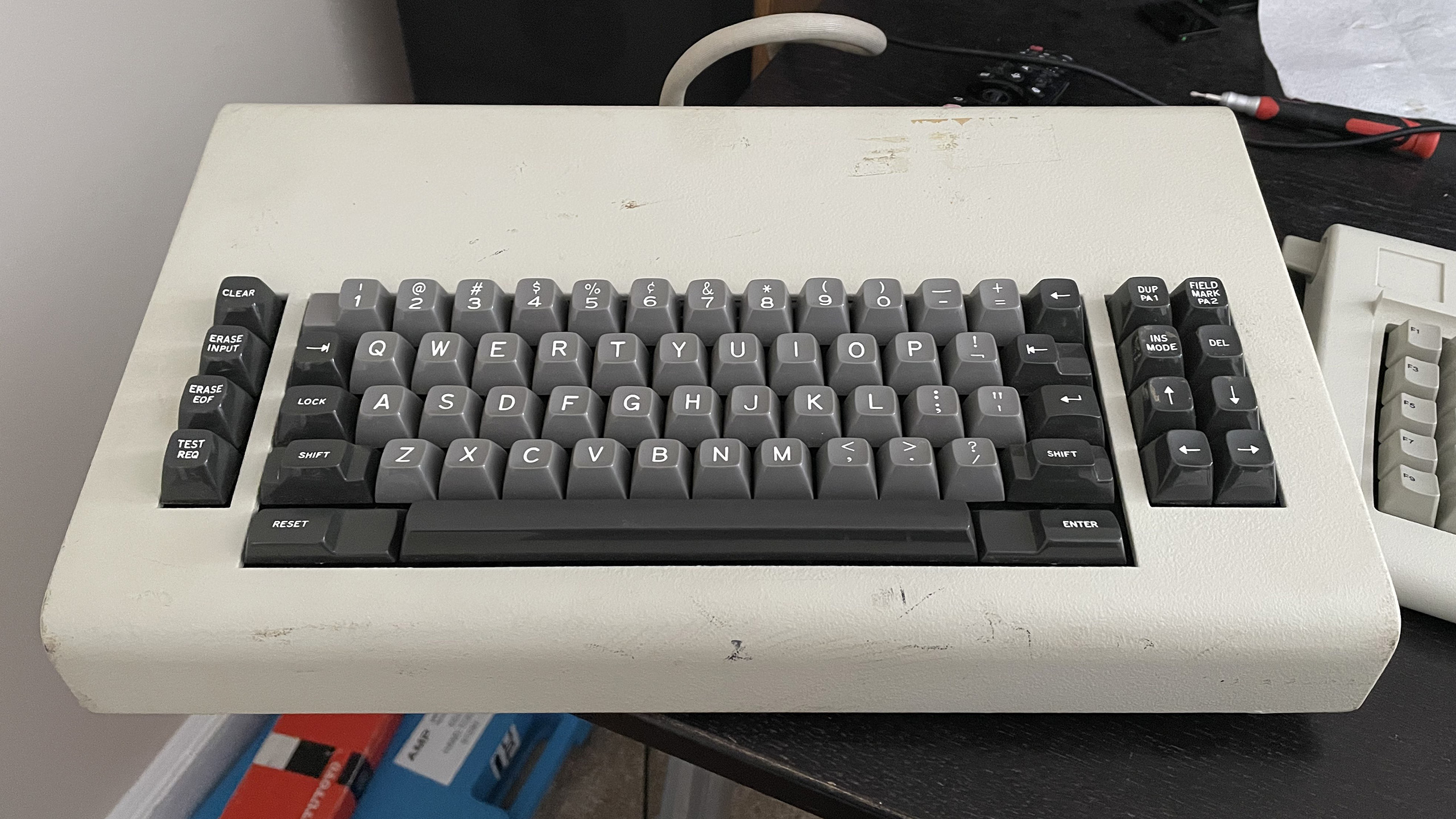
I find this story odd because IBM was consistent with their keyboard nomenclature across multiple products, and the 3270 series mainframe terminals used the Tab key, located in the same place where you would find a tab key on a modern keyboard, to move the cursor to the next field.
As an aside, it's worth noting that moving between fields was important enough on IBM terminals that they had a dedicated "back tab" key located on the opposite end of the keyboard to the tab key. On the original IBM PC, they decided to combine both functions into a single key. As a result, the tab key on the classic PC keyboard features the symbols for both forwards tab and back tab on the same key, the back tab symbol being on top to indicate that you need to hold down shift to use that function.
EDIT: The 5250 series terminals used the terms "Field Advance" and "Field Backspace" instead of Tab and Back Tab, but otherwise they used the same symbol on the keys, and the keys were located in roughly the same position as the 3270 series. Reference: https://www.bitsavers.org/pdf/ibm/5291/GA21-9409-0_5291_Disp...
Here's a real IBM 3270 keyboard.[1] Note the "Next field" key on the left, and the matching "Previous field" key on the right.
The IBM 3270 was a device for filling up forms. The mainframe sent the terminal a form with blanks, and the terminal let the user fill in the blanks. The terminal hardware prevented the user from overwriting the static parts of the form, and could apply some other form constraints, such as numeric fields. That was all done by the terminal. When the form was filled in, the user pressed ENTER, and the completed form was sent to the mainframe as one transaction. This approach let one mainframe service huge numbers of terminals. The user never experienced delays while typing and could type at full speed, often without looking.
PCs didn't have that usage model. The PC crowd was thinking "typewriter". One of the first terminals for home computers was called the "TV Typewriter".
Web forms do have that model, but with less consistency.
My favorite feature of 3270/5250-style keyboard layouts is the separate carriage return and Enter keys, allowing for multiline text entry without special handling to avoid conflicts with the command to signify that input is complete.
With only a single combined Enter/Return key, it's hard to remember in any given context whether Shift+Enter or Control+Enter will open up a new line instead of immediately sending a message, dismissing a dialog box, completing input into a particular spreadsheet cell, editable filename, text object in a drawing program, etc., or whether I need to copy/paste a line break from another application because no such shortcut exists at all.
The software I've used has been pretty consistent about Shift+Enter meaning "new line without triggering the Enter key action" and Ctrl+Enter meaning "action" (send the message, go to the next field, etc). The behavior of the Enter key varies from program to program, but I have yet to find a program where Shift+Enter triggered an action while Ctrl+Enter did not. Which software are you using where Shift+Enter triggers an action?
(I do agree that it's hard to remember what Enter is going to do, of course. It's just Shift+Enter where my experience differs from yours).
The SAP application model is such a form-based model (no surprise given that all five co-founders of SAP were ex-IBM consultants that were fired for moonlighting - specifically, for writing a payroll software for chemical giant ICI in assembler on ICI's mainframe in an extended night action...).
SAP call their forms "dynpros" (dynamic programms), and the reslting interactive mode of processing "realtime/dialog programming" as opposed to "batch processing". This all looked very IBM 3270-"inspired" (and so was the SAP logo made up of IBM blue with the well-known stripes...).
Nitpick: The terminology used by IBM on the 3270 family (including the 3277 whose keyboard you shared) was "Tab" and "Back tab", not "Next field" and "Previous field".
Yes: Page 30 of The Operator's Guide for IBM 3270 Information
Display Systems calls it a Tab key.
   Tab also has typamatic capability that allows you to move the cursor quickly from field to field.

  The Back Tab key moves the cursor back to the first character position in an input field. If the cursor is already in the first character position of an input field, and if you press the Back Tab key, the cursor will then move back to the first character position of the preceding input field.
So my guess is that the cursor defaults to being at the start of a field as you navigate, so Tab and Back Tab work as expected. But if you're editing a field and have moved the cursor within the field then Back Tab acts differently.
This is correct. It's also worth pointing out that the 3270 defaults to overwrite rather than insert mode, and has an "Erase EOF" key that deletes all text from the cursor position to end-of-field.
Note as well that a screenful of user-entered checked/constrained text, meant for some form of database query or insert, meant just one interrupt to the mainframe CPU; and all the info was there in an easy to parse format. Very low use of resources.
It looks really strange to have 3 keys right next to each other all pointed in the same direction.
As another head scratcher, what is the shift-1 symbol? The exclamation point appears to be the shift next to one of the 3 left arrow keys, but I'm also unfamiliar with the regular unshifted key. Anyone familiar with these?
On later generations of IBM terminal keyboard, you'll see | on the shift-1 position, and a separate key with the broken-bar (¦) symbol. For example, on this keyboard, the broken bar is below the backspace key along with the \ character. https://sharktastica.co.uk/image?id=qhTU8QvD
The reason for the two different types of bar/pipe characters, and why the original IBM PC keyboards only had the broken bar on the keyboard, involves a particularly arcane footnote of history relating to supporting the PL/I language on ASCII terminals: https://www.os2museum.com/wp/a-wunderbar-story/
I had never come across the broken bar before. I feel sorry for those that had to suffer these keys. The keyboard keys themselves look like they have about a mile of travel which was probably exhausting as well. I learned to type on clackity clackity arm typewriters, and those keys were I assumed designed by a masochist. These look even worse
The early 3270 keyboards (and the other IBM keyboards from the mid 70s up to the early 80s) are some of the most pleasant keyboards I've typed on in terms of key weighting and tactile feel. The length of travel is comparable to modern mechanical keyboards. The downside is how tall and aggressively angled the keyboards are, which are very far from modern ergonomic standards.
Those beam springs had the second-best feel ever, after the Selectric. Then the Model F cost-reduced (and thickness-reduced) it, and the Model M further.
> The downside is how tall and aggressively angled the keyboards are, which are very far from modern ergonomic standards.
Like a typewriter. And like a typewriter, you were expected to have them on suitable furniture so the keytops were at the right height.
Having worked at IBM, I would guess that using the tab key in this way was part of a patent they were pursuing and Microsoft's use would show this to be 'obvious' and thus not patentable. But that is just a guess.
In the 80's IBM had a whole class of high level technical people called "Systems Engineers" whose entire job description was to opine on the merits of any given system. Not write systems, not debug them, and certainly not to explain them, it was simply to opine "you're doing it wrong."
Microsoft is suffering from the lack of such a group today; they're definitely doing it wrong, where "it" is pretty much everything... except pissing off users.
For trademark safety, this is the correct approach. You can say "Blah for XXX" and that's fine but if you say "XXX blah" then you can get into trouble.
It's not a rule, it's just convention. Trademark law is about whether there is confusion about who made the product but not specific wording. Using "Blah For XXX" wording just makes it clearer.
"Tool for Windows" vs "Windows Tool"
The latter sounds much more like it could come from Microsoft. People repeat this because it avoids this confusion but it is not mandatory. A few projects on Github have had to be renamed because they've been challenged and the accepted solution from the trademark holder has has been to switch it around and become "for XXX".
In the present context, I'm reminded of IBM's "OS/2 for Windows", which, while actually a reduced-price version of OS/2 2.1 that used a customer's existing copy of Windows 3.1 to avoid the cost of licensing the Windows 3.1 components IBM shipped with OS/2 to support Windows compatibility, was also a marketing ploy to reposition OS/2 as a Windows enhancement rather than a replacement OS (which, to be fair, is not as misleading as it may sound, since OS/2 2.1, unlike Windows 3.1, is capable of memory protection and preemptive multitasking between Windows applications).
What if you just apply for a free sublicense and you get approved and your massive cadre of attorneys aren't fighting each other over 5 letters?
Apparently some HN people think that MS is so sleazy that they will just go "GPL yoink" and start running/advertising/supporting Linux without notice or consent the benevolent dictator. That's projection.
For a recursive acronym, I prefer LiNT, officially LiNT is NT, and unofficially, either Linux in NT or Linux is Not There, with the official and second unofficial definitions reflecting the WSL 1 architecture where WSL, like Win32, is a subsystem layered on top of the NT kernel, and doesn't rely on any Linux kernel code.
It's not a part of Linux, so it can't be a Linux subsystem. It is a part of Windows, so it is indeed a Windows subsystem. Also it started/replaced a part of the NT kernel called a Subsystem, so it is called a Windows Subsystem.
I don't know where that strong objection to this particular name comes from. MS does do weird things with names, like with Live, .Net or CoPilot, but this isn't one of those, but in fact named quite sensible. Would you also object to the 'Linux kernel module for Android'?
Use of the English language can often lead to ambiguity.
In the case of "Windows subsystem for Linux", it can be reasonably read that "for Linux" means that the functionality applies to Linux, i.e., to provide it with a subsystem that gives it Windows functionality.
Similarly, in the case of "Linux subsystem for Windows", it can be reasonably read that "for Windows" means that the functionality applies to Windows, i.e., to provide it with a subsystem that gives it Linux functionality.
> I would guess that using the tab key in this way was part of a patent they were pursuing and Microsoft's use would show this to be 'obvious' and thus not patentable.
Something that's bothered me about user-facing patents:
Let's assume that the idea of using a keyboard key to move between input fields in a software form is not obvious, and in fact is a brilliant stroke of genius the likes of which the world is not likely to see again. If that one guy hadn't been born, we would have gone thousands of years with no method, keyboard-based, mouse-based, or otherwise, of moving from one input field to another input field. Every piece of software would use nonconfigurable timers, and you'd just have to hope you could type fast enough.
I don't see what the hypothetical benefit of extending patent protection to this brilliant idea is supposed to be.
Say you're the company who comes up with the idea. You can benefit by including it in your product, where all your users can see it. In other words, the benefit you get from coming up with this idea is that you can publish it for the world to see, and that's the only way you can benefit from it. A usability feature that your users cannot use or know about doesn't increase usability.
Even though the idea isn't obvious, the implementation is. If you disclose your brilliant idea, everyone will copy it and your advantage in the marketplace will be transitory.
So... what is the purpose of giving you a patent? That cripples the marketplace, but it fails to realize the benefit of patents, publication. Publication necessarily had to happen anyway.
Err... wasn't your post a perfect example of why patents exist?
The concept probably has a real name, I call it first mover disadvantage. It is much easier to copy a mechanism than to invent it. So why even try? Every thing you have to spend real effort to invent is trivially copied the instant you try to sell it. And them copying it don't have to bear the nearly the R&D expenses you did. so it is trivial for them to sell this mechanism for less meaning you don't even get a fair slice of the pie.
So to try and limit this imbalance we invent a legal fiction, ownership, not of a physical thing, but the way it works. Not forever, but for 20 years you get ownership over those works.
Patents do have their problems, But I think the core idea is sound, create a registry of mechinisms, use this to provide economic protection to the inventor.
I worked on a software project make years ago. We spent a lot of money over months doing users studies to figure out the best UI for a narrow demographic.
The final UI was simple and intuitive, but it took a lot of money figuring it out.
I don't think the money would have been spent if our competition could immediately copy what we figured out.
Customers did benefit then, and now, 20 years later, anyone can do it, and humanity is little better off than if no research was done.
I don't know whether I'm missing something obvious, but with a patent, only the patenting company would use their patented idea. In your post you say:
> If you disclose your brilliant idea, everyone will copy it and your advantage in the marketplace will be transitory.
but that is the very point that patents are supposed to prevent. So why do you say that?
The post you're replying to says:
> I don't think the money would have been spent if our competition could immediately copy what we figured out. Customers did benefit then, and now, 20 years later, anyone can do it
so clearly the patent worked for them: they were able to use their simple and intuitive UI, while the competition could not copy it till 20 years later. So what is the question?
> “a brilliant stroke of genius the likes of which the world is not likely to see again. If that one guy hadn't been born, we would have gone thousands of years with no method”
But that’s not the criteria for granting a patent. It doesn’t have to be a stroke of genius. It can be something that many people could invent at the particular moment of the filing (as evidenced by many cases of near-simultaneous patent filings, like Daimler and Benz competing for the ICE in the 1880s). It just needs to be demonstrably novel.
I’m not saying tabbing back and forth through dialog fields qualifies, but then again it’s hard to place oneself in 1980.
The arrow keys, and enter, are the obvious ones to use, but you have to move off of home row to hit them. That's the "non-obvious" bit of using the tab key to navigate fields. Back when that level of usability was important.
> A usability feature that your users cannot use or know about doesn't increase usability.
Cannot is maybe doing a lot there. There's plenty of usability features that aren't really obvious or apparent unless you look very closely. Ex: pinball machines have timed shots, but there's almost always a grace period so if you contact the ball with your flipper around when the timer hits zero and it makes the shot, chances are you'll get credit for it even though the timer expired. That's a usability feature most users won't ever notice. At WhatsApp, I would never send an S40 user a verification code where the 4th digit was 8, because if you got a text message with 123-890, s40 would turn -8 into an 8th note emoji; until today, probably 3 people knew that ... but it dramatically improved usability.
> Even though the idea isn't obvious, the implementation is. If you disclose your brilliant idea, everyone will copy it and your advantage in the marketplace will be transitory.
> So... what is the purpose of giving you a patent? That cripples the marketplace, but it fails to realize the benefit of patents, publication. Publication necessarily had to happen anyway.
If I had gotten a patent on the 'avoid -8 in verification codes', then the technique would have been public for everyone to see. So publication for exclusivity / forced licensing is an exchange of value between society and the inventor. Of course, avoid -8 is pretty obvious, when someone testing the s40 client complains about getting an 8th note in their verification code message, you make a quick tweak to code selection to avoid sending those.
For an invention that must be disclosed to be used, society isn't really getting anything in return for exclusivity. Maybe promotion of progress, theoretically, I guess, in that whoever thinks of it first gets paid; leading more people to think about things?
You're missing the historical context. Prior to patents, inventions would commercialized as magic tricks and the mechanisms hidden. Then the inventor died and the secrets were lost.
For example, Cornelis Drebbel air conditioned Westminster Abbey in 1620. King James I (of the Bible) thought it was a cool party trick. But there was little ecosystem to commercialize and Drebbel moved on with his life, trying to sell other products with temperature controlled feedback loops + a submarine. Then he died.
The only commercialized invention of his was creating a dye that was redder than others. His son-in-law kept that a family secret and focused on selling this improved dye throughout Europe, since that didn't require revealing the secret.
The rational move was to give up on a multitrillion dollar HVAC industry to sell redder dye, since the second could be a trade secret.
And after reading the Wikipedia article on Drebbel, how have I never heard of this guy?
I'm particularly curious how the Royal Navy failed to realize the value of the submarine.
Reading over the article on the history of the torpedo, it sounds like early attempts to weaponize, by Drebbel and others, were unsuccessful.
Even so — bearing in mind that this a undoubtably a reflection of my own bias as a child of the Cold War raised in the shadow of the largest military-industrial complex the world has ever known — I can't help but marvel at the fact that no spare-no-expenses crash development programs arose to operationalize effective submarine-based warfare by the naval powers of the time.
> the benefit you get from coming up with this idea is that you can publish it for the world to see, and that's the only way you can benefit from it
That’s your opinion, but it’s not the spirit of the law. I’m personally fully against Intellectual Property, including for movies and music, for reasons that are obvious (public money is being spent aimlessly trying to prevent two private individuals from copying things that are copied by their very nature of being published - or trying to prevent people from using ideas that are contagious - what next, put a copyright on political ideas? on dance moves? on beautiful colors?) but that’s not the law.
> we would have gone thousands of years with no method
There are other methods: The 4 arrows. The tab method is much more efficient and easy to implement, but we would have gone with the 4-arrows-to-navigate-fields method.
IBMs earliest block mode terminals with field entry, including the 3270, predate the microprocessor. They were fully implemented with fixed hardware control.
> I would guess that using the tab key in this way was part of a patent they were pursuing and Microsoft's use would show this to be 'obvious' and thus not patentable.
IBM insisting it not to be tab wouldn’t make sense. Microsoft was working for them and the programs should adhere to the CUA (Common User Access) standard.
OS/2 1.0 and the first edition of the CUA were both released in December 1987 according to Wikipedia; Raymond's story isn't dated but could've happened before this. (If I had to make a wild guess, I could imagine this request was a side effect of some internal IBM battle about what the CUA should dictate).
Do you remember what the official definition was? I admit I was working at an internship in FEIS (Field Engineering Information Services) in Colorado and people with that title would occasionally yo-yo in to a meeting make some comment that didn't apply and then yo-yo out again. None of the engineers in the organization had anything but disdain for them. If you were late 80's, I was interning in the late 70's so its entirely possible that they restructured the job responsibilities somewhat. But again I'd really love to see what was the official job description from the time.
> IBM was consistent with their keyboard nomenclature across multiple products, and the 3270 series mainframe terminals used the Tab key
While it seems odd in light of IBM's usual adherence to corporate norms across business units, having read a couple different books on the origins of the PC at IBM, it may be related to the entire PC unit in Boca being an extraordinary aberration outside the norm for IBM. Despite seeming hopelessly corporate to the Microsoft team, the Boca IBMers were considered a "Rebel Unit" inside IBM - when they were considered at all, since the vast majority of IBM wasn't even aware of it.
Due to being started virtually overnight (in IBM timescales), running incredibly fast and only existing thanks to Thomas Watson, Jr. himself overruling his lieutenants to approve such a "skunk works", Boca didn't have nearly the level of oversight, coordination or control as an effort that size normally would. In the early days Boca ran largely outside normal reporting channels and when they'd try to source tech or components from other parts of IBM, had to sometimes clarify that they were in fact part of IBM.
From what I remember, there were two "Enter/Return" keys on IBM 3270 terminals. One was the regular "Return" key we have today, which just advanced to the next field, and didn't submit the form. There was also another "Enter" key where the Right Ctrl key is today, and that submitted the form. So, I presume, instead of being against Tab key, IBM might be against "Return" to be the form submit key as people who use 3270 would expect it to advance to the next field.
And that was true for many DOS programs. Pressing Return would just go to the next field, not submit the form. That was one of the things that needed some getting used to on Windows.
Your memory is correct, and it's interesting to note that on the IBM terminal keyboards, the Enter key was marked "Enter", and the return/new line key was marked "↵". On the classic IBM PC keyboards such as the Model M, the Enter key is marked "↵ Enter". I believe IBM chose this to convey that the Enter key on the PC was both an "Enter" _and_ "Return" key in one. As you say though - individual applications got to chose what that meant in practice, leading to inconsistent behavior.
Not being familiar with the term CUA, I looked it up and TIL something (https://en.wikipedia.org/wiki/IBM_Common_User_Access). Since the doc you linked is dated 1988 and CUA was a brand new thing circa OS/2 (at least in traditional IBM timescales), the apparent inconsistency might be down to the massive scale of IBM in those days and organizational propagation delay.
Another factor could be still-reverberating echoes of the likely political battles around something as broad and far-reaching as CUA. I can only imagine the quiet boardroom battles won and lost fighting over CUA between different factions across all of IBM's kingdoms, divisions and principalities.
It looks like it they wanted to use their existing special field management keys (field advance and field backspace) with tab being a different user experience. [0] Document does even use the word "Tab". "Field Backspace" seems to duplicate "Home" key usage under some conditions.
To be fair, Microsoft & Bill Gates are bad at quality user experience. "Ctrl+F" differs through their applications.
The more I think of it the current TAB (SHIFT+TAB) key should of been used for entry navigation navigation only while the white space tab should of been something such as "SHIFT+SPACE".
"To be fair, Microsoft & Bill Gates are bad at quality user experience."
In some ways. Gates deserves never-ending enmity for plaguing us with backslashes in paths. But in others, Microsoft advanced the state of UI and UX more than anyone else in the '90s.
I don't really remember many Windows 95 firsts. One I remember is the ability to switch users without logging off. MacOS famously copied that (with a 3D cube look).
I think they made something really revolutionary at the IE3 time. Their News and Mail app was an Explorer extension that placed an e-mail reader as the presentation of a folder full of folders of mailboxes and messages. You wouldn't see the extension, as the apps launched as applications, but that's what the implementation looked like from what I investigated back then.
Unfortunately, the idea was seemingly abandoned almost immediately. I would love to have such views on top of a user-space file system keeping messages, address books, and calendars in sync.
I meant UI stuff like the desktop metaphor (Macintosh also had one but Win95's approach was more popular and mimicked in other environments), the start menu, the taskbar, etc, some newly introduced controls like tabs (i think OS/2 had tab-like controls/containers but they worked differently to those in Win95 and nowadays pretty much all tabs work like in Win95).
At my first ISP job, I eventually started using mh for mail. It was based on an awesome concept of sorting everything into directories and having procmail and various helpers to pre-process, including upon receipt and reading. I remember little of the details, but it was truly for the gung-ho neckbeard crowd, and it was well-suited for processing "large amounts" of mail (1993 style). I think MMDF was the MTA trying to do similar things in that vein. Meanwhile my boss was in love with PINE...
Of course, working at an ISP I could also telnet to our NNTP server and read Usenet on the local filesystem. Ugh.
I know about the theme, i'm using Window Maker which uses a theme closer to NextStep and occasionally i hack on a toolkit[0] that has a Next-ish look (and feel, to some extent).
However i meant stuff like the desktop metaphor (Macintosh also had one but Win95's approach was more popular and mimicked in other environments), the start menu, the taskbar, etc, some newly introduced controls like tabs (i think OS/2 had tab-like controls/containers but they worked differently to those in Win95 and nowadays pretty much all tabs work like in Win95).
The use of recessed surfaces for displaying information and the rectangular buttons were very NeXT-like, but more compact because it needed to work at VGA resolutions, but I don't think they managed to capture the essence of their framework which is, impressively, still alive in every Mac sold.
I wonder how hard it would be to get NeXT source from the 1990's and compile it on macOS 26.
And the contemporaneous counterexamples are what? The various UNIX windows managers and X11? System 6-8 on the '90s Macs? None of those were great UI/UX IMO.
The big thing I remember from Windows back then were contextual menus (Windows 95 vs MacOS 8), the Start menu and Explorer (Not sure why the Mac never developed one - apps were easier to find, I guess) with a folder tree on the left, which Finder lacked (but you could always have two windows with different views). In general, the user experience with Macs was smoother than with Windows, with the move to PowerPC being a huge improvement in performance over the 68040 models.
As pointed out elsewhere, NeXT broke a lot of new ground at that time, thanks in part to its Unix underpinnings. Also Adobe brought great font management to both PCs and Mac before both embraced TrueType. Next had sub pixel anti-aliasing from the start.
Not sure the case that the parent refers to, but there's a good reason that CTRL-F in the Win95/Exchange Mail client and Outlook will invoke the Forward email message command.
It goes back to what is the common action that the user would perform in the app. Forwarding an email is more common that Finding text in an email - at least to Billg.
I am trying to think of other older examples, but I know I have seen it before Workspaces/Chromebook:
The upstart adopts all the keyboard shortcuts of the dominant player. Then the existing userbase is comfortable... compatible, with the new and different software.
Then, slowly but surely, new novel shortcuts are introduced and you gradually find the “compatible” ones vanishing or conflicting or just glitched, until one day you’re no longer capable of using Apple or Word or Netscape or Excel.
I propose that IBM saw that coming, and fought against a future where IBM-trained users easily adopted someone else’s apps.
Sad to hear this, one of my first mechanical keyboards was a Filco TKL. At one point in time, it was my go-to "safe recommendation" for a keyboard. Since that point in time, the Majestouch keyboards only received incremental improvements, whereas the likes of Keychron completely overtook them on almost all criteria.